Getting paid
You'll record full and partial customer payments, handle deposits and credit memos, and read the AR aging report.
- Principles:
- Revenue recognition
- Double-entry
Recording a customer payment
When a customer pays an invoice, cash goes up and what they owe goes down. That's it.
There's no new revenue here. You already counted the revenue when you sent the invoice. Counting it again would double your sales.
| Account | Debit (Dr) | Credit (Cr) |
|---|---|---|
| Business Checking | $1,762.00 | |
| Accounts Receivable | $1,762.00 | |
| Total Balanced | $1,762.00 | $1,762.00 |
Memo: Check received and deposited.
Are you Increasing or Decreasing?
| Debit | Credit |
|---|---|
| Liability | Asset |
| Equity | Draw |
| Revenue | Expense |
− To decrease an account, put it on the opposite side.
Accounts Receivable goes down: press − and find Asset on the credit side.
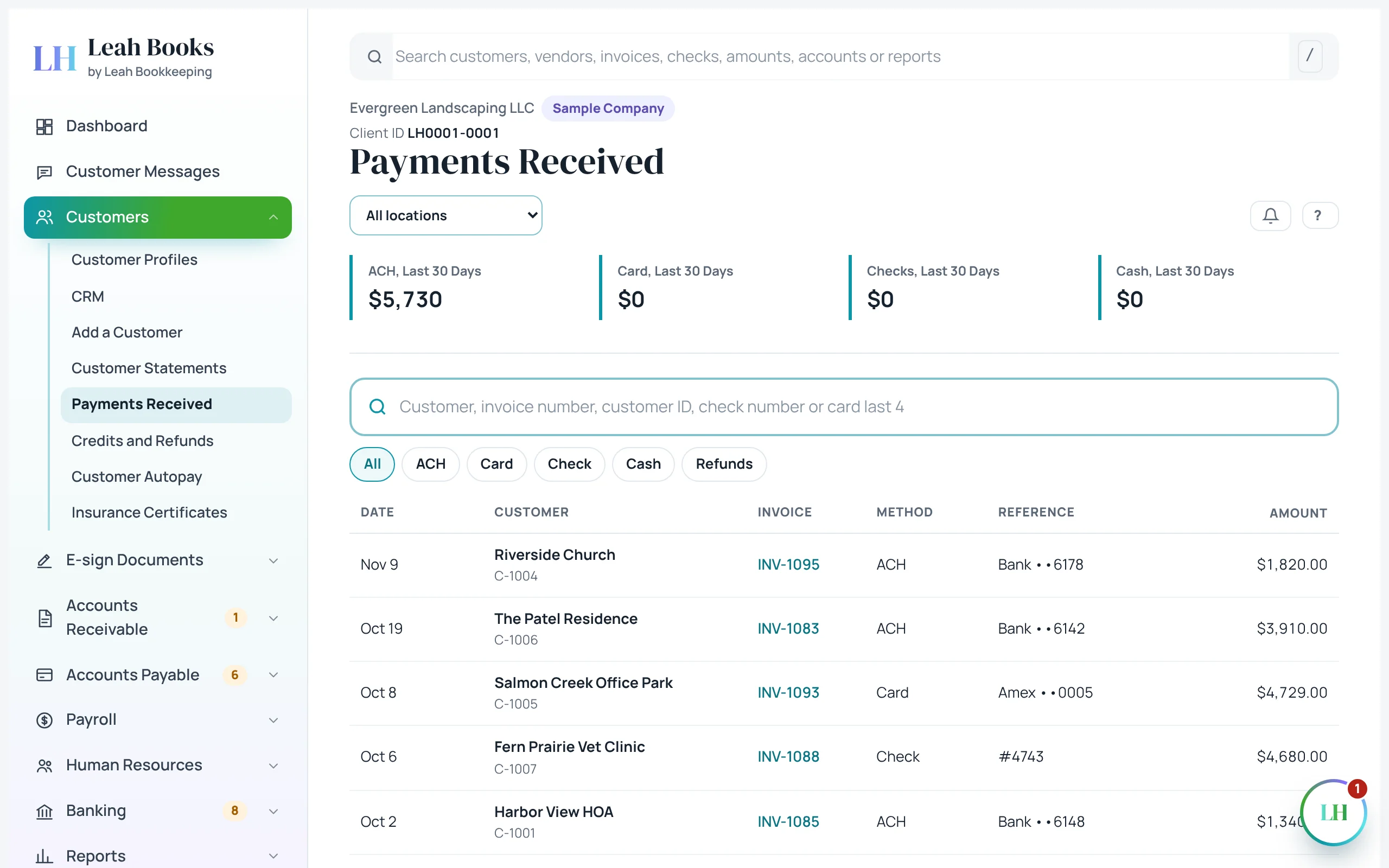 (opens the full-size screenshot)
Partial payments
Sometimes a customer pays part of an invoice. Record exactly what came in. The rest stays open, and the invoice shows Partly paid.
If Columbia Dental Group had paid $1,000 of the $1,762, the entry would be a $1,000 debit to Business Checking and a $1,000 credit to Accounts Receivable. They'd still owe $762.
Deposits before the work: unearned revenue
Sometimes customers pay before you do the work, like a deposit on a planting job. You have the cash, but you haven't earned it yet.
So it isn't revenue. It's a liability called unearned revenue: you owe the customer either the work or their money back. Leah Books keeps these in an account called Customer Deposits.
When you finish and invoice the job, you apply the deposit: debit Customer Deposits, credit Accounts Receivable. The revenue itself comes from the invoice.
| Account | Debit (Dr) | Credit (Cr) |
|---|---|---|
| Business Checking | $1,500.00 | |
| Customer Deposits | $1,500.00 | |
| Total Balanced | $1,500.00 | $1,500.00 |
Memo: Unearned until the work is done.
Are you Increasing or Decreasing?
| Debit | Credit |
|---|---|
| Asset | Liability |
| Draw | Equity |
| Expense | Revenue |
+ To increase an account, put it on its normal side.
Business Checking goes up: press + and find Asset on the debit side.
Credit memos
A credit memo lowers what a customer owes: for a return, an overcharge or a goodwill credit. It takes the amount back out of income.
Say Maple Street Apartments was billed $240 for a hedge trimming visit that got rained out. In Leah Books the credit memo first sits in Customer Credits, then comes off the invoice when you apply it. Once applied, the overall effect is below.
| Account | Debit (Dr) | Credit (Cr) |
|---|---|---|
| Landscaping Services | $240.00 | |
| Accounts Receivable | $240.00 | |
| Total Balanced | $240.00 | $240.00 |
Memo: Credit memo applied to their open invoice.
Are you Increasing or Decreasing?
| Debit | Credit |
|---|---|
| Liability | Asset |
| Equity | Draw |
| Revenue | Expense |
− To decrease an account, put it on the opposite side.
Landscaping Services goes down: press − and find Revenue on the debit side.
The AR aging report
The AR aging report sorts what customers owe by how late it is. The older an invoice gets, the harder it usually is to collect, so check this report often and follow up early.
Leah Books groups balances like this:
| Column | What's in it |
|---|---|
| Current | Not due yet |
| 1 to 30 days | Up to 30 days past the due date |
| 31 to 60 days | 31 to 60 days past due |
| 61 to 90 days | 61 to 90 days past due |
| Over 90 days | More than 90 days past due. Time for a serious follow-up. |
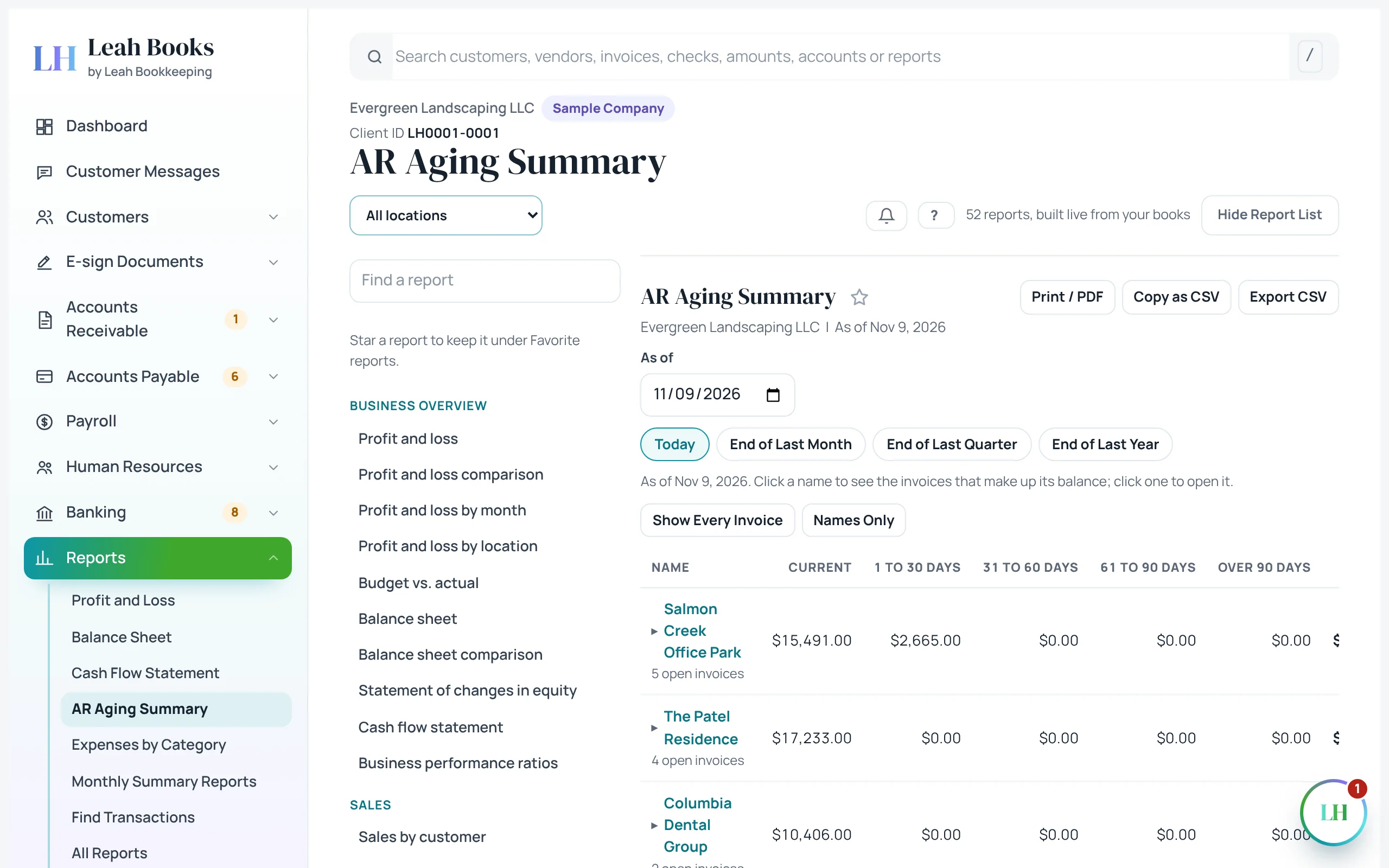 (opens the full-size screenshot)
Try it in Leah Books
- Go to Accounts Receivable > All invoices and open an invoice that's Open or Overdue. If you have none, create and send one first.
- Click Take payment, choose Check, and change the amount to less than the balance. Record it.
- Look at the invoice again: it now shows Partly paid and the smaller balance due.
- Go to Customers > Payments received and find the payment you just recorded.
- Open Reports > AR aging summary and see which customers have balances past due.
Key terms
- Customer payment
- Money received from a customer to pay an invoice. It lowers Accounts Receivable; it isn't new revenue.
- Partial payment
- A payment for less than the full invoice. The rest of the invoice stays open.
- Unearned revenue
- Money received before the work is done. A liability until it's earned.
- Customer deposit
- A payment made before an invoice, held as unearned revenue until applied to the invoice.
- Credit memo
- A document that lowers what a customer owes, for a return, overcharge or goodwill credit.
- AR aging report
- A report that groups what customers owe by how many days past due it is.
- Overdue
- An invoice that hasn't been paid by its due date.
Check what you learned
Pick an answer to see if it's right and why. Nothing is saved or sent.