Bank and credit card transactions
You'll categorize bank and card lines, spot transfers and matches, treat a credit card as a liability, and bring in a statement file.
- Principles:
- Double-entry
Your bank account in the books
Business Checking is an asset in your books. Money in is a debit; money out is a credit.
Your bank statement may say the opposite, calling deposits "credits." That's because it's written from the bank's side: to the bank, your money is something it owes you. In your own books, cash in is a debit.
The bank shows that money moved. Your job is to say why, by giving each line a category.
Categorizing a line
Each new line waits in Banking > Bank transactions until you review it. Leah Books never guesses a category. A line gets one only from a bank rule or a confident match, and it says why.
In the sample books, a rule says anything with CHEVRON in it is Fuel. So the $86.42 Chevron charge comes in already set to Fuel, and you just add it.
| Account | Debit (Dr) | Credit (Cr) |
|---|---|---|
| Fuel | $86.42 | |
| Business Checking | $86.42 | |
| Total Balanced | $86.42 | $86.42 |
Memo: Rule: Chevron → Fuel
Are you Increasing or Decreasing?
| Debit | Credit |
|---|---|
| Liability | Asset |
| Equity | Draw |
| Revenue | Expense |
− To decrease an account, put it on the opposite side.
Business Checking goes down: press − and find Asset on the credit side.
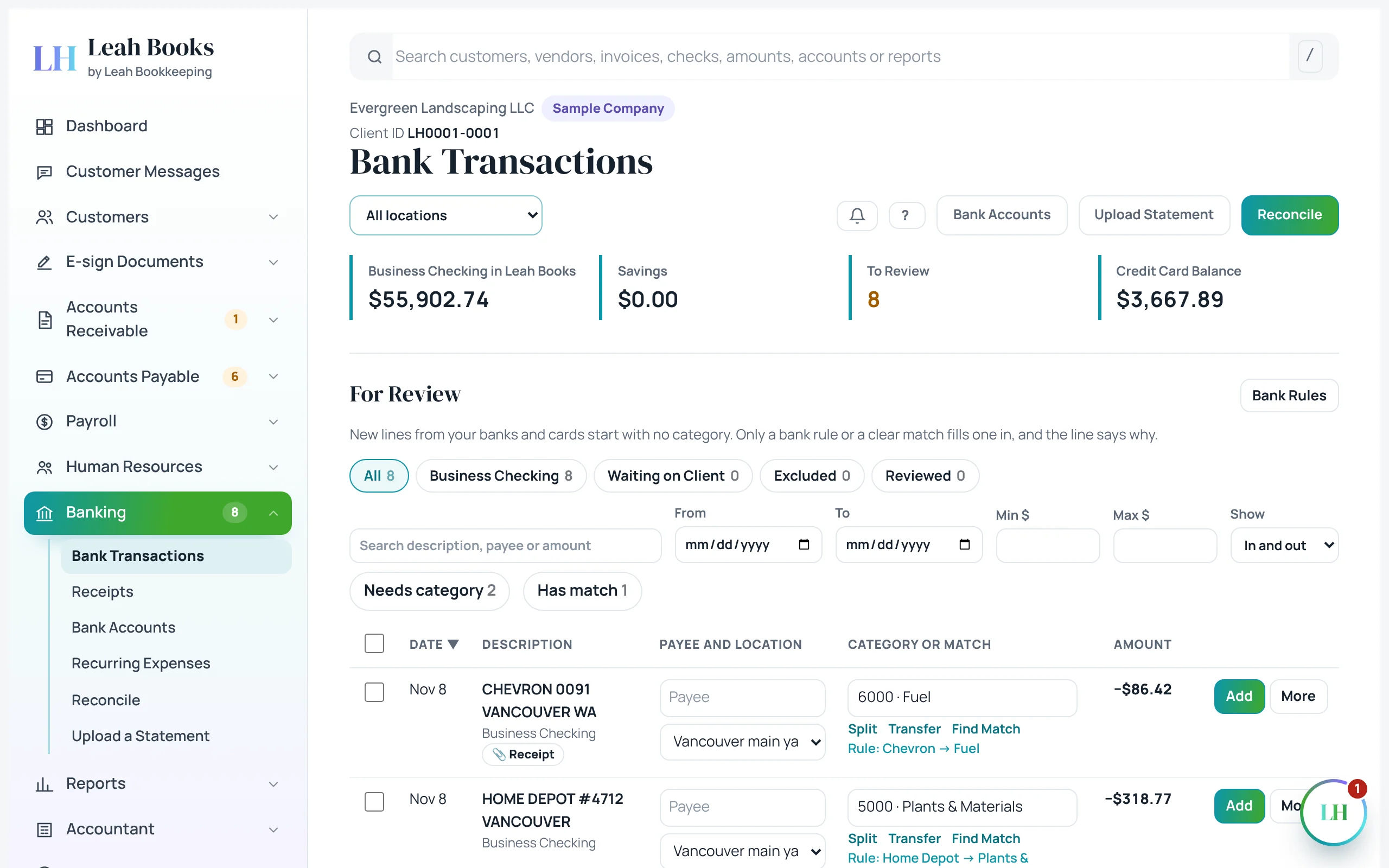 (opens the full-size screenshot)
Already in the books? Match it
Many bank lines are already recorded: a customer payment on an invoice, a bill you paid, a check you wrote. Adding those again would count them twice.
In the sample, the ACH DEPOSIT HARBOR VIEW HOA line matches an open invoice. Click Match and Leah Books records the payment on that invoice. No new revenue.
Transfers aren't income or expenses
Moving money between your own accounts is a transfer. You didn't earn or spend anything, so profit doesn't change.
Paying off the business credit card from checking is a transfer too. The expenses were recorded when you charged them. Use Set as transfer on the line and pick the other account.
| Account | Debit (Dr) | Credit (Cr) |
|---|---|---|
| Savings | $5,000.00 | |
| Business Checking | $5,000.00 | |
| Total Balanced | $5,000.00 | $5,000.00 |
Are you Increasing or Decreasing?
| Debit | Credit |
|---|---|
| Liability | Asset |
| Equity | Draw |
| Revenue | Expense |
− To decrease an account, put it on the opposite side.
Business Checking goes down: press − and find Asset on the credit side.
A credit card is a liability
A business credit card is money you owe the card company, so it's a liability. Charges make the balance go up (a credit). Payments make it go down (a debit).
The expense counts when you make the charge, not when you pay the card. Evergreen pays for its online ads with the Business Credit Card.
| What happened | Debit | Credit |
|---|---|---|
| Charge online ads on the card | Advertising | Business Credit Card |
| Pay the card bill from checking | Business Credit Card | Business Checking |
| Account | Debit (Dr) | Credit (Cr) |
|---|---|---|
| Advertising | $260.00 | |
| Business Credit Card | $260.00 | |
| Total Balanced | $260.00 | $260.00 |
Are you Increasing or Decreasing?
| Debit | Credit |
|---|---|
| Asset | Liability |
| Draw | Equity |
| Expense | Revenue |
+ To increase an account, put it on its normal side.
Advertising goes up: press + and find Expense on the debit side.
Getting transactions in: upload a statement
Automatic bank feeds aren't switched on in Leah Books yet. Instead, you bring transactions in from a statement file.
Download the statement from your bank's website as a CSV file. Open Banking > Upload a statement, pick the account and drop in the file. The lines land in Bank transactions for review. Anything already in Leah Books is skipped.
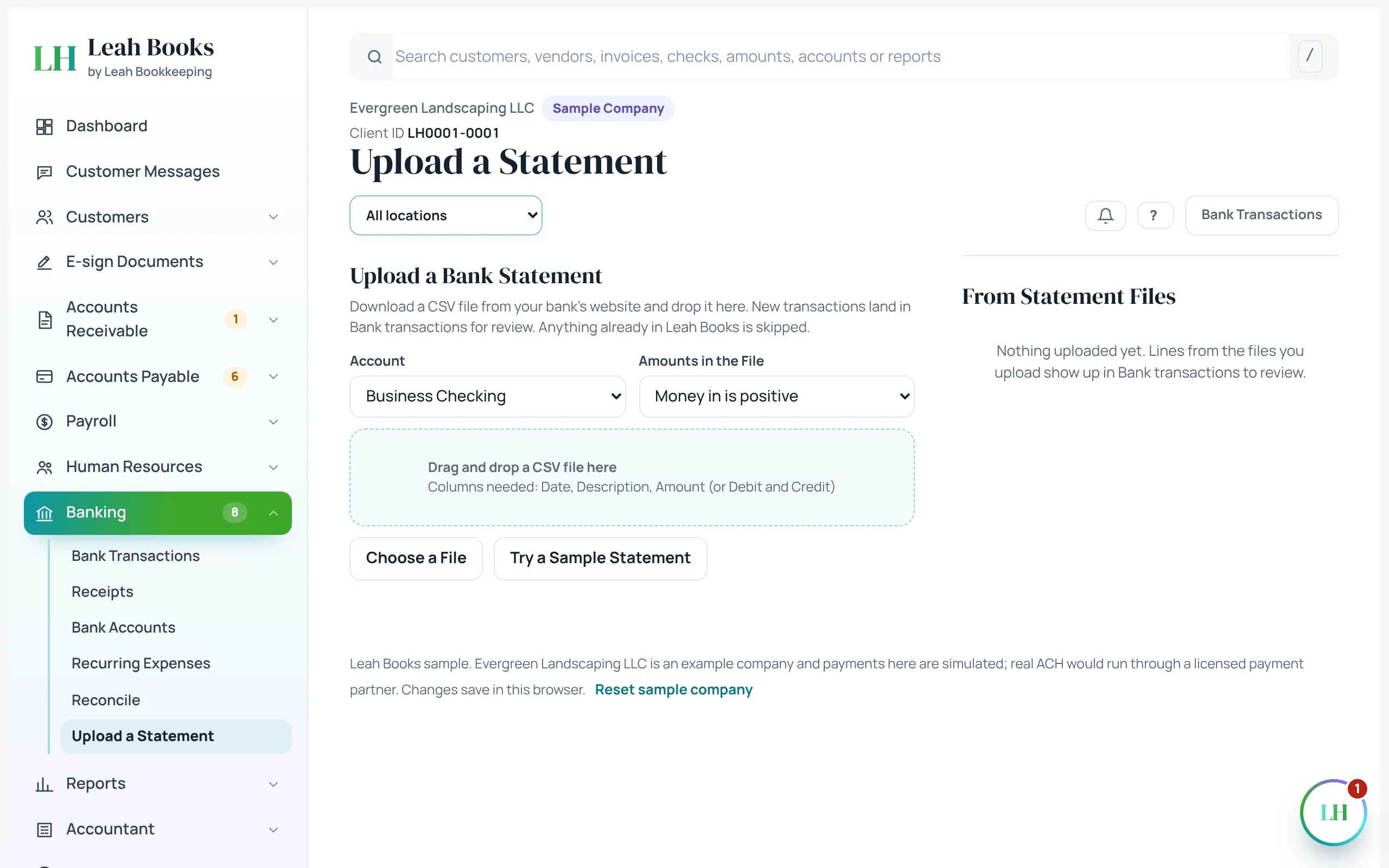 (opens the full-size screenshot)
Try it in Leah Books
- Go to Banking > Bank transactions. If none are waiting, use Banking > Upload a statement and click Try a sample statement first.
- Pick a line, check its category, and click Add.
- Find a bank fee or a fuel purchase and check it's set to the right expense account before you add it.
- Find a deposit from a customer and click Match to record it against their open invoice, if Leah Books suggests one.
- Open Banking > Upload a statement to see where a CSV file from your bank would go.
Key terms
- Bank transaction
- One line of money in or out of a bank or card account.
- Categorize
- Choose the account that explains why the money moved.
- Bank rule
- A setting that fills in the category for lines that match, like CHEVRON → Fuel.
- Match
- Link a bank line to something already in the books so it isn't recorded twice.
- Transfer
- Money moved between your own accounts. Not income and not an expense.
- Credit card (liability)
- A card balance is money you owe, so it's a liability that charges increase and payments decrease.
- CSV file
- A plain spreadsheet-style file most banks let you download; Leah Books reads statements in this format.
Check what you learned
Pick an answer to see if it's right and why. Nothing is saved or sent.